%22%20fill%3D%22none%22%20stroke%3D%22%23fff%22%20stroke-opacity%3D%22.45%22%20stroke-width%3D%221.3%22%2F%3E%3Cpath%20d%3D%22M16%207.2L8.4%2024.6M16%207.2l7.6%2017.4M11%2018.2h10%22%20stroke%3D%22%23fff%22%20stroke-width%3D%222.6%22%20stroke-linecap%3D%22round%22%20fill%3D%22none%22%2F%3E%3Ccircle%20cx%3D%2216%22%20cy%3D%227%22%20r%3D%223.2%22%20fill%3D%22%235eead4%22%20stroke%3D%22%23fff%22%20stroke-width%3D%221.3%22%2F%3E%3C%2Fsvg%3E)
Dependency explorer
The dependency explorer turns an AL app or a multi-app workspace into an interactive 3D graph you can rotate, filter, search, and replay over time. It is the Dependencies page of the BC Atlas panel in VS Code, and bca export --view explorer writes it as a file. It answers two questions the static diagrams cannot answer at a glance:
- Which dependencies stay inside one app, and which cross app boundaries? Cross-app dependencies are checked against
app.json, so an app that uses another app without declaring it stands out in red. - How did the architecture get here? With
--history, the timeline replays every commit that changed AL files orapp.json: objects and dependencies appear, change, and disappear in the order they were committed.
bca export ./workspace --view explorer -o dependencies.html            # current source
bca export ./workspace --view explorer --history -o dependencies.html  # replay Git history
bca export ./workspace --view explorer --history-by prs -o dependencies.html       # one frame per pull request
bca export ./workspace --view explorer --history-by releases -o dependencies.html  # one frame per release
bca export ./workspace --view explorer --format json -o graph.json     # the data behind it
Open the HTML file in any current browser. It is one self-contained file (about 1.4 MB, most of it the WebGL renderer): no server, no network access, and you can attach it to a work item or publish it as a pipeline artifact.
Try the multi-app example.
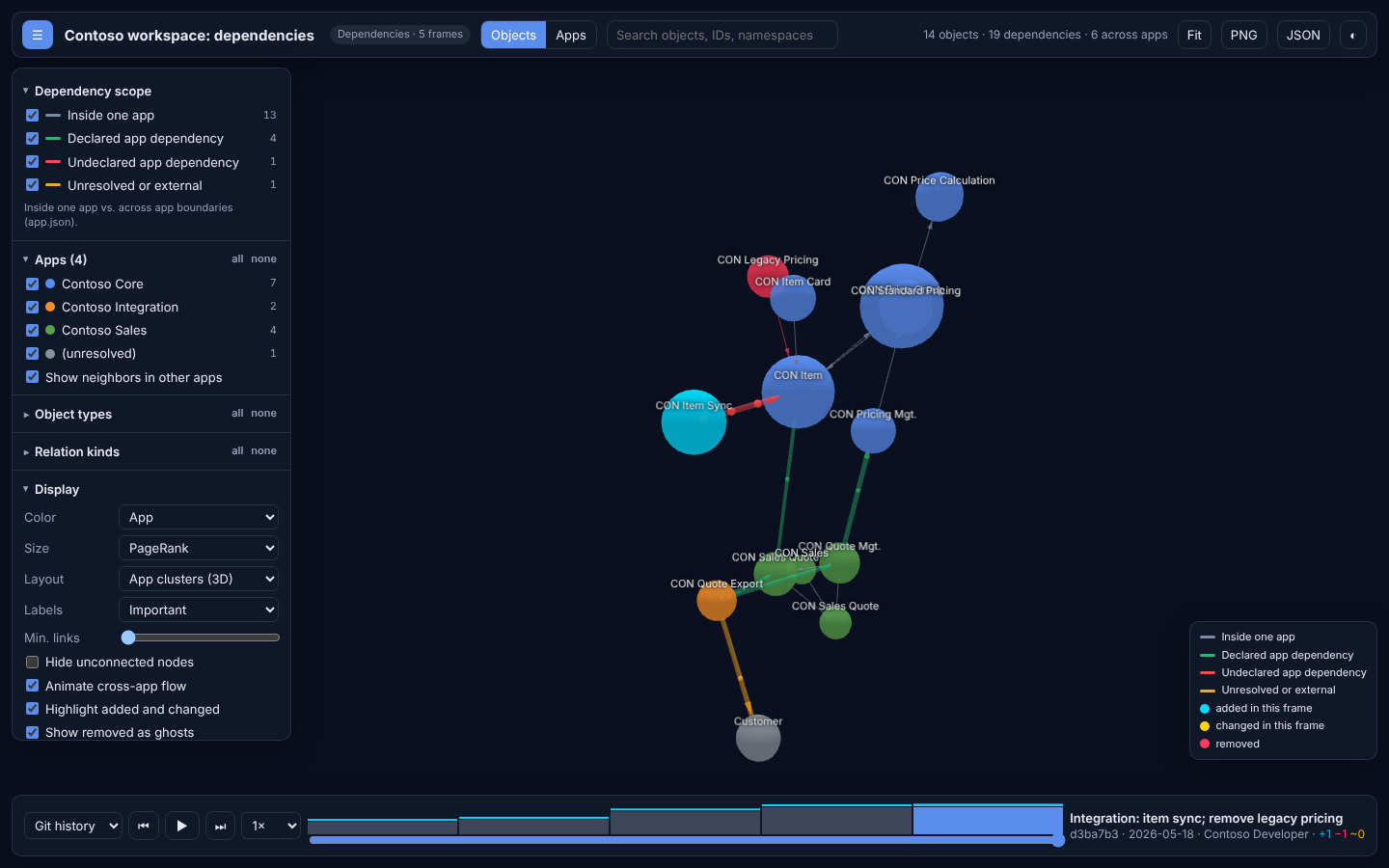
Inside one app vs. across apps
Every dependency edge is classified from the point of view of the app that owns the source object:
| Class | Meaning | Color |
|---|---|---|
intra-app | Source and target belong to the same app (and the same module). | gray |
cross-module | Source and target belong to different modules of the same app. | purple |
declared | The target app is listed in the source app's app.json dependencies. | green |
implicit | The target is a Microsoft app from .alpackages that app.json pulls in through application or platform, or a platform system object such as Integer, Date, Field, AllObjWithCaption, Company, or a System "..." permission. | blue |
undeclared | The target belongs to another workspace app that app.json does not declare. The app will not compile on its own. | red |
unresolved | The target could not be resolved, usually because .alpackages symbols are missing. | amber |
Cross-app edges are drawn thicker and carry animated particles in the direction of the dependency; undeclared ones carry more. Add .alpackages symbols to resolve Base Application and System Application objects instead of seeing them as unresolved.
Three levels
- Objects shows one node per AL object. By default (layout Open space), the graph floats freely in a large space, like the large-graph example of 3d-force-graph: small nodes, hairline links colored by dependency class, and groups that drift together, so there is room to fly through the graph. The groups follow Color: apps, components, communities, object types, or build layers. Tightly coupled objects (one writes or extends the other) sit closer together than loosely coupled ones (events, permission grants); see Coupling weights. App clusters pulls each app into a tight cluster instead; cross-app dependencies then span the space between clusters.
- Modules appears when an app contains nested
app.jsonfiles, as the System Application and the Base Application in BCApps do. The AL compiler builds every file below an app folder, so a nestedapp.jsonmarks a module of that app, not an app of its own. Each module manifest declares which modules and apps the module may use, and module edges are checked against it:declared,declared-unused,undeclared(a module uses another module it does not declare), andcross-module(the app's root code uses a module). Select a module and choose Show its objects to drill down. - Apps shows one node per app. Its edges merge the declared dependencies from
app.jsonwith the observed object references:declared(declared and used),declared-unused(declared but no object uses it),undeclared,implicit, andunresolved. Select an app and choose Show its objects to drill down.
Target architecture
When .bca.json defines an architecture section, or with --propose, the explorer adds a Components level and marks every dependency that points the wrong way in red, with its resolution in the details. The timeline shows the number of violations per commit. See Clean architecture.
Large repositories
--paths restricts analysis and history replay to some folders of a large repository; everything else is not even parsed. For the Base Application in BCApps, include its declared dependencies so that they resolve:
bca export ./BCApps/src --view explorer \
  --paths "Layers/W1/BaseApp" \
  --paths "System Application/App" \
  --paths "Business Foundation/App" \
  --history --since 2026-06-28 --max-commits 40 \
  -o base-application.html
That graph has about 8,600 objects and 72,000 dependency edges. The explorer embeds graphs above 2 MB gzip-compressed (about a tenth of the size) and starts graphs with more than 20,000 object edges on the module level; drill down from a module or app to its objects. Replaying a frame of the Base Application takes about 15 seconds after the first one, because only changed files are parsed again. Give Node.js more memory for such graphs, for example NODE_OPTIONS=--max-old-space-size=12000.
Relationship kinds
A dependency edge aggregates every way one object depends on another. The Relation kinds filter lets you keep only some of them:
| Kind | Source |
|---|---|
extends | Table, page, report, and enum extensions; interface inheritance. |
implements | Codeunits implementing interfaces. |
calls | Resolved procedure calls between objects. |
uses | Variables, parameters, and return values of an object type. |
reads, writes | Record operations such as Get, FindSet, Insert, Modify. |
relates | TableRelation and other schema relations. |
selects | Enum values that select an interface implementation. |
runs, part | Page navigation and page parts. |
subscribes | Event subscribers on another object's events. |
permits, includes | Permission sets granting access and including other sets. |
Each edge keeps its weight per kind and up to twelve pieces of evidence (file, line, procedure), or three for edges inside one module. Click an edge to see them.
The fourth dimension: time
The timeline at the bottom replays the graph frame by frame. Press Space to play, ← and → to step, or click a bar.
Git history (
--history): one frame per step that changed an AL file orapp.jsonbelow the project root.--history-bychooses the step:--history-byOne frame per Frame shows commits(default)commit the commit message prsmerged pull request on the main line (first parent) PR #12, the pull request title, and how many commits it broughtreleasesrelease tag reachable from HEAD, plus "Unreleased" for later commitsthe tag, its message, and how many commits changed AL since the previous release Pull requests are recognized from GitHub merge commits ("Merge pull request #12"), squash merges ("Title (#12)"), Azure DevOps ("Merged PR 12: Title"), and GitLab merge commits ("See merge request group/project!12"). Commits pushed directly to the main line stay frames of their own. Tags from before the project existed are skipped.
Objects that appear in a frame are cyan, objects whose file changed are yellow, and removed objects stay as red ghosts for two frames. Newly added nodes grow out of an existing neighbor, so you can watch the architecture being built. With uncommitted AL changes, the working tree is the last frame.
Build order: available without Git. Frame 0 shows the objects (or apps) without dependencies, each next frame adds those whose dependencies are now all in place. On the app level this is the compile order of the workspace. Cycle members share one layer.
The bar chart above the slider shows the size of the graph per frame with added, changed, and removed marks. --last 10 replays only the last 10 steps, and --since only recent work. For long histories, --max-commits samples the steps evenly and always keeps the first and the last one. A frame then covers several steps, and the frame info says how many commits (and pull requests or releases) it stands for.
Choose the layout Commit timeline axis (4D) to turn time into space: objects are placed from left to right by the commit that introduced them. Build order as floors stacks the build layers on top of each other, and Apps as floors gives every app its own level, ordered by app build order.
Filter and explore
| Control | What it does |
|---|---|
| Dependency scope | Show or hide each class, for example only cross-app dependencies. |
| Apps | Restrict to apps. Show neighbors in other apps keeps the direct dependencies of the selected apps visible in gray. |
| Object types, relation kinds | Restrict nodes and edges. An edge stays visible while at least one of its kinds is selected. |
Search (/) | Highlights matches by name, ID, type, namespace, file, or app; Enter flies to the first match. |
| Min. links, hide unconnected | Remove weakly connected nodes. The slider runs from 0 to the number of links that 95% of the nodes stay under (at least 10, at most 200), so it also thins out large graphs. |
| Spacing | Room between nodes, from 50 % to 500 %: longer links (longest between large nodes), stronger repulsion, and more distance between clusters and floors. The explorer remembers it. |
| Color | App, object type, community (Louvain clustering on coupling weights), build layer, age (first commit), or cross-app coupling. In open space, also what drifts together. |
| Size | PageRank on coupling weights (default), used by, depends on, cross-app links, or uniform. |
| Layout | Open space (default), app or component clusters, free force, architecture layers as floors, apps as floors, build order as floors, commit timeline axis, or flat 2D. |
Click a node to highlight its neighborhood and open its details: app, namespace, source file and line, metrics, its dependencies inside and across apps, and its history. Isolate neighborhood hides everything else; +1 level widens the neighborhood. Right-click a node to fly to it, drag it to pin it. PNG saves the current view and JSON the visible subgraph.
The graph has the whole window: the filters open with ☰ or F, and the explorer remembers whether they are open. Fit frames the connected objects. Drag to rotate, scroll to zoom into the graph, right-drag to pan.
Keyboard: Space play, ← → step, / search, Esc clear selection, 1 objects, 2 modules, 3 apps, F filters.
Metrics
Every node carries metrics computed with graphology:
| Metric | Meaning |
|---|---|
inDegree, outDegree | Distinct objects that use this object, and that it uses. |
crossAppIn, crossAppOut | The same, counting only edges across apps. |
pagerank | Weighted PageRank: high for objects many important objects depend on. |
community | Louvain community; often reveals modules that cut across namespaces. |
buildLayer | 0 without dependencies, otherwise one more than the deepest dependency. |
cycle | Index of the dependency cycle the node belongs to, if any. |
Graph document (JSON)
--format json writes the bc-atlas.graph document that the explorer embeds. Use it for your own scripts or other graph tools.
{
  "schema": "bc-atlas.graph",
  "schemaVersion": 1,
  "lens": { "id": "dependency", "title": "Dependencies" },
  "timeline": { "source": "git", "commits": 5, "frames": [{ "index": 0, "id": "65c6194", "label": "Core: items, price groups, and pricing", "date": "...", "stats": { "nodes": 6, "addedNodes": 6 } }] },
  "levels": {
    "object": {
      "nodes": [{ "id": "...", "label": "CON Item", "type": "table", "app": "...", "presence": [[0, null]], "changes": [], "metrics": { "pagerank": 0.21, "buildLayer": 1 } }],
      "edges": [{ "source": "...", "target": "...", "scope": "inter-app", "dependency": "undeclared", "kinds": { "reads": 1, "writes": 1 }, "presence": [[4, null]] }]
    },
    "app": { "nodes": [], "edges": [] }
  }
}
presence lists the frames in which a node or edge exists as [first frame, end frame] pairs; null means it still exists. changes lists the frames in which its source file or its relation kinds changed.
Open source
The explorer is built only on MIT-licensed open source: 3d-force-graph and three.js render the WebGL scene; graphology builds the graph model and computes PageRank and Louvain communities. The renderer is embedded in the HTML file, so the explorer works offline.
Lenses
dependency is the first lens. A lens turns the architecture model into an object level and an app level; history, metrics, filters, and the viewer work the same for every lens. Calls, data access, events, contracts, UI navigation, and permissions will follow as lenses of their own (see the roadmap).